In practice with Haven: Bible Verse Widget
How to review app growth each week.
Start with what changed. Check what the numbers mean. Leave with one question worth answering and a clear way to follow it up.
A weekly app review should connect a number to a decision. Scan acquisition, activation and revenue, choose the question that matters, then keep its evidence and next step together.
Here we use Haven, one of our own published apps. Its onboarding completion rate gives us a concrete question to work through in Indevaro. The screenshots are from the real workspace; the follow-up brief below is a proposed next step.
Step 1
Read the week in context.
Open your app’s Overview. Start with the explanation of what the connected sources can tell you. Read the period beside each metric: store downloads, advertising and product analytics can cover different dates and populations.

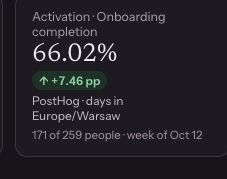
For this review, focus on Onboarding completion. The card keeps the percentage, number of people and week together.
- What was measured
- 171 of 259 people completed the measured onboarding funnel.
- When
- 12–18 October 2026, in Europe/Warsaw.
- Compared with
- The preceding week, 5–11 October. The displayed change is +7.46 percentage points.
The 66.02% rate gives us a question to investigate: what changed for the people entering onboarding that week?
Step 2
Check what the change means.
Open Product evidence to read the assessment and its limits. In this capture, Indevaro reports “No material change in what is measured” and explains that freshness is inferred.

The positive delta on Overview and this assessment answer different questions: one reports the observed change; the other applies a review policy. Before deciding to change onboarding, check:
- The same definition. Compare the same funnel steps, population and timezone in both weeks.
- Complete, stable periods. A closed week can still be revised. Read the stability status before relying on the comparison.
- The counts in both weeks. Keep the number of people beside the rate. One week’s denominator does not establish that the baseline is adequate.
- What else changed. Check releases and acquisition mix. A different audience can change completion rates without an onboarding change.
If the summary does not include the baseline count or acquisition mix, check it in your connected analytics. A positive weekly change is a starting point for investigation; establishing its cause needs additional evidence.
Step 3
Write one useful next step.
Go to Actions → New action. Start with a question that the evidence can answer. For Haven, a focused follow-up is:
Does Haven’s onboarding completion change hold across comparable, complete weekly windows?
Give it a clear title, such as “Review the onboarding completion change”, and choose A focused follow-up. Review the question before creating the draft.
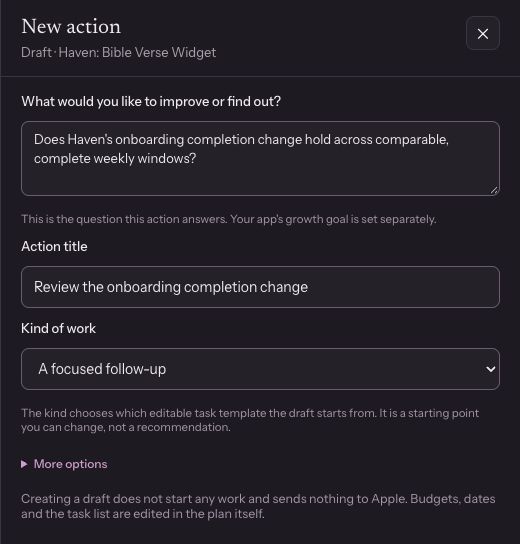
After creating your own draft, adapt its tasks and evaluation details. The template is a starting point. This brief gives the review a concrete finish:
Proposed review brief
Review the onboarding completion change
- Bring together
- The 5–11 and 12–18 October measurements, both counts, funnel definition, timezone and stability information.
- Check
- Whether instrumentation, a release or the mix of arriving users changed. Mark anything you cannot verify.
- Leave with
- A recorded decision: keep observing, fix a measurement gap, or prepare one specific onboarding experiment.
- Review when
- The required periods and checks are available. Choose a date to revisit the work if you are waiting on evidence.
Step 4
Return with evidence.
Use Today to pick up open work and reviews that are due. Check the date of the priority list before treating it as current. A review reminder tells you to look again; it does not establish a successful result.
Open the action, record what actually happened and add the relevant observations. Then record your decision. If the evidence is still incomplete, explain what is missing and when you will revisit it.
Haven already had an older onboarding follow-up awaiting review when we inspected the workspace. It had no assessed outcome. The October metric does not automatically complete that earlier action; the periods and original question still need to match.
The useful output of this walkthrough is a review question and brief that someone can carry forward. A measured result comes after the work and its evaluation.
Your weekly app review checklist
Use these five questions for your own app.
- What changed, and which source reported it?
- Are the periods, people and definitions comparable?
- What does the evidence support, and what is still unknown?
- What is the smallest useful next check or change?
- Where will I record the result, and when will I return?
Keep the answers with the action so the next review starts with the context intact.
About this example
Haven: Bible Verse Widget is an app owned by the team behind Indevaro. We inspected its authenticated workspace on 23 October 2026. These are cropped, unaltered screenshots of the live interface; the action form contains an unsaved example we wrote for this guide.
The walkthrough uses PostHog onboarding evidence. It does not report an increase caused by Indevaro, a completed experiment or a revenue result. Counts and dates describe this snapshot, not a live dashboard.
To follow the same workflow, add your app and connect the relevant analytics with a configured onboarding measurement. A store listing alone cannot supply this private funnel data.
Start with the app you have shipped.
For a first step using public evidence, Next Move reviews your store listing and recent reviews. You can connect private sources in the workspace when you are ready for a review like Haven’s.
Find my next move — freeNo account needed for the first public listing review. See what it includes.